Obsidian: works for me, and what I put in will work for the future.
Morgan Murrah
The problem
Ive been in a malaise. Many software products around notes and knowledge keeping are not quite a good fit, and the effort Ive put into them seems lost years later. You can tap stuff into them… or write big important notes… and they just dont seem handy or manageable afterwards.
Keep, Apple Notes, Evernote… Ive tried a few. They did not feel built to last.
Keep and Apple Notes are locked into the walled garden system in a database and not as easily worked with. Often they dont sync with file systems or work well with common file management tools. Basically I might put a few grocery lists in there, but all my actual important thoughts seemed too important to put there.
Evernote was fun for a while but went out of business and required exporting in a special format. Nope.
Enter Obsidian.
Obsidian feels good because it starts with the right promise: local-first Markdown notes that belong to you. The app is built around plain-text files, links, and a design that is both simple for everyday writing and deep enough for serious knowledge work.
In an era of software that often feels brittle, bad and crap… Obsidian has stood out for me over the recent times as a highlight for various reasons below…
Local-first, portable, and resilient
What Obsidian gets right is the separation of data from application. Your notes are not locked inside a proprietary database. They are Markdown files in a folder, which means they are portable, searchable by any text editor, and durable over time.
That is exactly the kind of software design I want from a note system. The website makes this clear: Obsidian is about owning your own notes, not the platform. If Obsidian disappears tomorrow, the data is still yours.
Keeps them honest! Why can’t more product be like this, I wonder…
Markdown as a foundation
Obsidian leans into Markdown as the core format. That gives it a natural fit for writing, code snippets, and formatting without abstraction. On obsidian.md you can see how the product celebrates Markdown.
This is good design because it keeps the app honest. There is no hidden format translation layer. The same text you type is the same text you can version-control, sync, and reopen later.
Links, backlinks, and the graph
One of Obsidian’s signature strengths is the way it makes connections visible. The website highlights linking and backlinks as central features, and for good reason:
- bidirectional links that let a note know where it is referenced
- a graph view that shows your note network at a glance
- easy creation of note links with
[[square brackets]]
These are not just flashy features. They are evidence of solid information architecture. Obsidian treats notes as a web of ideas.
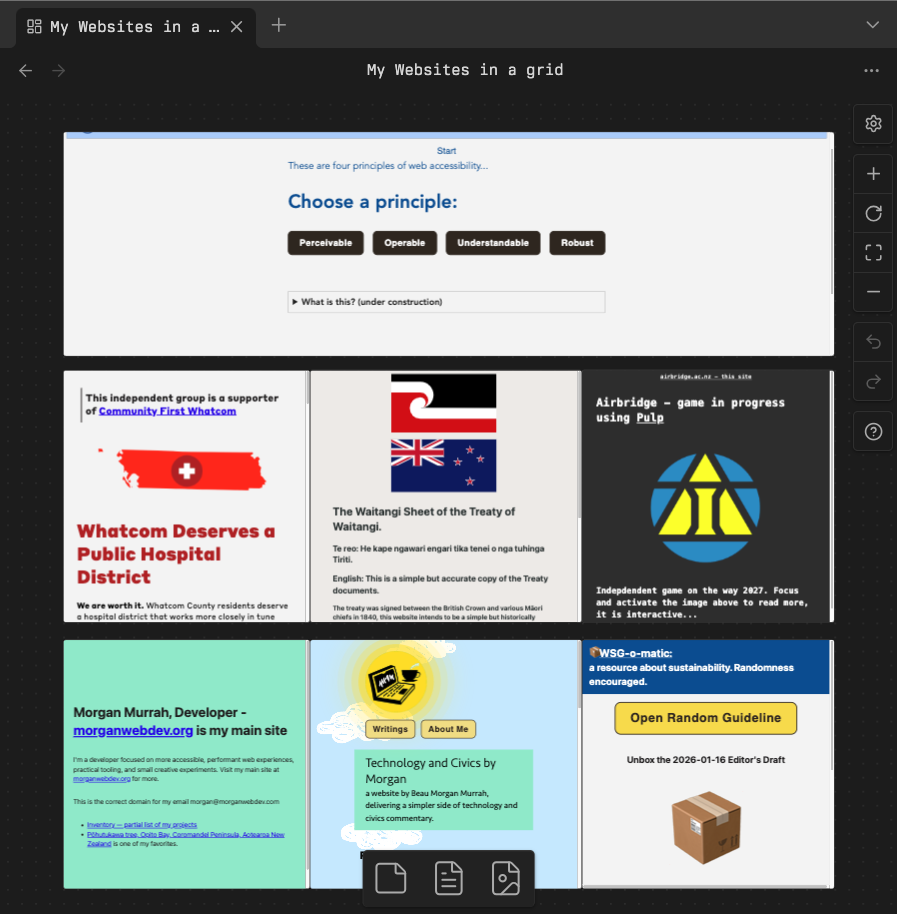
I love the Canvas feature which allows me to display a tiled set of my websites, reminding me they are live and functioning:
Thoughtful defaults and progressive complexity
Obsidian’s interface works for beginners while still scaling to power use. The website shows a clean editor, sidebars, and plugins without overwhelming the user. That balance is hard to do well.
Good software design is about giving people an immediately useful experience, then letting them add complexity only when they want it. Obsidian does that with:
- a simple note editor by default
- an optional command palette and hotkeys
- incremental access to backlinks, tags, and graph analysis
- a plugin ecosystem that can be enabled per vault
Plugins, themes, and extensibility
Obsidian’s marketplace is another example of strong design. The app itself stays focused on note management and Markdown, while a plugin API enables a huge ecosystem. This is good architecture:
- core functionality remains stable
- power features live in plugins
- users can choose only what they need
The website shows community plugins, themes, and extensions as first-class experiences, which is smart. It keeps Obsidian from becoming bloated while still letting it do almost anything.
Good software design in practice
When I look at Obsidian through the lens of good design, I see a few clear principles:
- data ownership: the user owns the vault
- transparency: notes are plain Markdown files
- extensibility: plugins extend behavior without breaking the core
- modularity: editor, graph, and sidebar tools each do one job well
- longevity: portable files and open formats mean the system survives change
These are qualities I want in any productivity tool, especially one that is meant to hold my long-term thinking. I have had problems with previous tools for note taking in the past, such as Evernote, which went out of business…
The biggest reason Obsidian is a good choice is that it is designed to be useful for the long haul.
Optional services that make you feel like a customer, not the product.
Sync and Publish are options available through the organization behind it.
I pay for Sync and keep all my mobile and desktop devices in sync with it, and cherish key files that are backed up in sync!
Something about this feels like Im actually buying something good and useful.
Conclusion
Obsidian is good because it pairs practical note-taking features with smart software design. The website’s messaging around local-first Markdown, linking, and extensibility is not just marketing — it reflects how the product is built.
Obsidian has brought me joy, and a lot of software doesn’t necessarily do that. Happy to be a paid customer, and own all my local data… keeps them on their toes a little, keeps me safe and happy. That sort of design makes it feel like a thoughtful tool, one that respects both the content you create and the way you might want to use it years from now.